<?xml version="1.0" encoding="utf-8"?><feed xmlns="http://www.w3.org/2005/Atom" ><generator uri="https://jekyllrb.com/" version="3.10.0">Jekyll</generator><link href="/feed.xml" rel="self" type="application/atom+xml" /><link href="/" rel="alternate" type="text/html" /><updated>2026-03-22T01:00:43+00:00</updated><id>/feed.xml</id><title type="html">Johnson’s Site</title><subtitle>Just another random site on the internet.</subtitle><author><name>Johnson</name><email>admin@j3soon.com</email></author><entry><title type="html">How to Export iPhone Portrait Photos with Depth Data Preserved</title><link href="/posts/preserve-iphone-depth-data-when-exporting/" rel="alternate" type="text/html" title="How to Export iPhone Portrait Photos with Depth Data Preserved" /><published>2024-11-14T00:00:00+00:00</published><updated>2024-11-14T00:00:00+00:00</updated><id>/posts/preserve-iphone-depth-data-when-exporting</id><content type="html" xml:base="/posts/preserve-iphone-depth-data-when-exporting/"><![CDATA[<h2 id="introduction">Introduction</h2>

<p>As an iPhone 15 user, I frequently use Portrait Mode for my photos. It allows me to adjust the focus and depth of field after taking the shot. However, I encountered some difficulties when trying to export these photos to an external hard drive for backup, as the depth data would be lost after exporting. What’s even more frustrating is that I couldn’t find a clear solution online. After trying various methods, I discovered two ways to export portrait photos with depth data intact, allowing them to be re-imported to an iPhone for further editing.</p>

<p><strong>Device:</strong> iPhone 15 Pro</p>

<p><strong>iOS Version:</strong> 17.2.1</p>

<p><strong>TL;DR:</strong> Export unmodified original image, or export “All Photos Data” to a MacBook.</p>

<h2 id="method-1-export-unmodified-original-image">Method 1: Export Unmodified Original Image</h2>

<p>This is the easiest way to preserve depth data in the exported image. However, <strong>any edits</strong>—such as adjustments, filters, or cropping—<strong>will be lost</strong>. Here are the steps:</p>

<ol>
  <li>
    <p><strong>Export Unmodified Original</strong></p>

    <p>Export the image by selecting <code class="language-plaintext highlighter-rouge">Export Unmodified Original</code>, and saving it to files.</p>

    <p><img src="../../assets/images/posts/preserve-iphone-depth-data-when-exporting/10.png" alt="" /></p>

    <p>This version of the image is larger because it includes depth data. You can then transfer it to an external hard drive or upload it to cloud storage.</p>

    <p><img src="../../assets/images/posts/preserve-iphone-depth-data-when-exporting/11.png" alt="" /></p>
  </li>
  <li>
    <p><strong>Re-import the Image into the Photos App for Editing</strong></p>

    <p>Choose <code class="language-plaintext highlighter-rouge">Save Image</code> or download it from cloud storage to re-import it into the Photos app.</p>

    <p>Note that the portrait effect will be <strong>disabled</strong> in the re-imported image.</p>

    <p><img src="../../assets/images/posts/preserve-iphone-depth-data-when-exporting/05.png" alt="" /></p>
  </li>
  <li>
    <p><strong>Re-enable Portrait Effect</strong></p>

    <p>You can re-enable portrait effect simply by using either of the following methods:</p>

    <ol>
      <li>Tap <code class="language-plaintext highlighter-rouge">Edit</code> to open the photo editor. Tap the <code class="language-plaintext highlighter-rouge">Portrait</code> button at the top, or drag the aperture slider to your preferred value, and then tap <code class="language-plaintext highlighter-rouge">Done</code>.</li>
      <li>Alternatively, you can tap the portrait dropdown menu at the upper left corner and select <code class="language-plaintext highlighter-rouge">Portrait</code> to quickly re-enable the effect.</li>
    </ol>

    <p>The original aperture setting and focus point are preserved. In edit mode, the white dot indicates the original aperture value, and the yellow box marks the focus point.</p>

    <p><img src="../../assets/images/posts/preserve-iphone-depth-data-when-exporting/12.png" alt="" /></p>
  </li>
</ol>

<h2 id="method-2-export-all-photos-data-to-a-macbook">Method 2: Export “All Photos Data” to a MacBook</h2>

<p>This method allows you to preserve depth data by exporting two versions of the image: one with depth data and the other without it. However, this method only works when exported via AirDrop. It does not work when saving to files.</p>

<ol>
  <li>
    <p><strong>Export the Image</strong></p>

    <p>Select <code class="language-plaintext highlighter-rouge">Options</code> and choose <code class="language-plaintext highlighter-rouge">All Photos Data</code>.</p>

    <p><img src="../../assets/images/posts/preserve-iphone-depth-data-when-exporting/07.png" alt="" /></p>
  </li>
  <li>
    <p><strong>Export to MacBook via AirDrop</strong></p>

    <p>Choose the device you want to export to in AirDrop contacts. On your Mac or MacBook, accept the file transfer and select <code class="language-plaintext highlighter-rouge">Save to Downloads</code>.</p>

    <p><img src="../../assets/images/posts/preserve-iphone-depth-data-when-exporting/08.png" alt="" /></p>
  </li>
  <li>
    <p><strong>Locate the Image File</strong></p>

    <p>In the saved folder, you will find two files:</p>
    <ul>
      <li>A smaller image <em>with</em> the portrait effect and edits applied, but without depth data.</li>
      <li>A larger image file <em>without</em> the portrait effect or edits, but <strong>containing the depth data</strong>.</li>
    </ul>

    <table>
      <thead>
        <tr>
          <th> </th>
          <th style="text-align: center">Portrait Effect</th>
          <th style="text-align: center">Edits (Adjust/Filter/Crop)</th>
          <th style="text-align: center">Depth Data</th>
        </tr>
      </thead>
      <tbody>
        <tr>
          <td>Smaller Image</td>
          <td style="text-align: center">✓</td>
          <td style="text-align: center">✓</td>
          <td style="text-align: center">✗</td>
        </tr>
        <tr>
          <td>Larger Image</td>
          <td style="text-align: center">✗</td>
          <td style="text-align: center">✗</td>
          <td style="text-align: center">✓</td>
        </tr>
      </tbody>
    </table>

    <p><img src="../../assets/images/posts/preserve-iphone-depth-data-when-exporting/13.png" alt="" /></p>
  </li>
</ol>

<hr />

<p>By following this guide, you can easily export iPhone portrait photos with the depth data preserved for future editing. Feel free to contact us if you know of better ways to achieve this on iOS 17.2.1 or newer versions.</p>

<blockquote>
  <p>This is a guest post written by <a href="https://www.youtube.com/@J1soon">@J1soon</a>.</p>
</blockquote>]]></content><author><name>Johnson</name><email>admin@j3soon.com</email></author><summary type="html"><![CDATA[Introduction As an iPhone 15 user, I frequently use Portrait Mode for my photos. It allows me to adjust the focus and depth of field after taking the shot. However, I encountered some difficulties when trying to export these photos to an external hard drive for backup, as the depth data would be lost after exporting. What’s even more frustrating is that I couldn’t find a clear solution online. After trying various methods, I discovered two ways to export portrait photos with depth data intact, allowing them to be re-imported to an iPhone for further editing. Device: iPhone 15 Pro iOS Version: 17.2.1 TL;DR: Export unmodified original image, or export “All Photos Data” to a MacBook. Method 1: Export Unmodified Original Image This is the easiest way to preserve depth data in the exported image. However, any edits—such as adjustments, filters, or cropping—will be lost. Here are the steps: Export Unmodified Original Export the image by selecting Export Unmodified Original, and saving it to files. This version of the image is larger because it includes depth data. You can then transfer it to an external hard drive or upload it to cloud storage. Re-import the Image into the Photos App for Editing Choose Save Image or download it from cloud storage to re-import it into the Photos app. Note that the portrait effect will be disabled in the re-imported image. Re-enable Portrait Effect You can re-enable portrait effect simply by using either of the following methods: Tap Edit to open the photo editor. Tap the Portrait button at the top, or drag the aperture slider to your preferred value, and then tap Done. Alternatively, you can tap the portrait dropdown menu at the upper left corner and select Portrait to quickly re-enable the effect. The original aperture setting and focus point are preserved. In edit mode, the white dot indicates the original aperture value, and the yellow box marks the focus point. Method 2: Export “All Photos Data” to a MacBook This method allows you to preserve depth data by exporting two versions of the image: one with depth data and the other without it. However, this method only works when exported via AirDrop. It does not work when saving to files. Export the Image Select Options and choose All Photos Data. Export to MacBook via AirDrop Choose the device you want to export to in AirDrop contacts. On your Mac or MacBook, accept the file transfer and select Save to Downloads. Locate the Image File In the saved folder, you will find two files: A smaller image with the portrait effect and edits applied, but without depth data. A larger image file without the portrait effect or edits, but containing the depth data.   Portrait Effect Edits (Adjust/Filter/Crop) Depth Data Smaller Image ✓ ✓ ✗ Larger Image ✗ ✗ ✓ By following this guide, you can easily export iPhone portrait photos with the depth data preserved for future editing. Feel free to contact us if you know of better ways to achieve this on iOS 17.2.1 or newer versions. This is a guest post written by @J1soon.]]></summary></entry><entry><title type="html">New Website</title><link href="/posts/new-website/" rel="alternate" type="text/html" title="New Website" /><published>2024-07-23T00:00:00+00:00</published><updated>2024-07-23T00:00:00+00:00</updated><id>/posts/new-website</id><content type="html" xml:base="/posts/new-website/"><![CDATA[<p>Please visit my new website at: <a href="https://home.j3soon.com">https://home.j3soon.com</a></p>

<!--more-->]]></content><author><name>Johnson</name><email>admin@j3soon.com</email></author><summary type="html"><![CDATA[Please visit my new website at: https://home.j3soon.com]]></summary></entry><entry><title type="html">Pythagorean Means</title><link href="/posts/pythagorean-means/" rel="alternate" type="text/html" title="Pythagorean Means" /><published>2021-07-20T00:00:00+00:00</published><updated>2022-02-25T20:12:59+00:00</updated><id>/posts/pythagorean-means</id><content type="html" xml:base="/posts/pythagorean-means/"><![CDATA[<div style="visibility: collapse; display: none;">
A short comparison of Pythagorean Means: the arithmetic mean (AM), the geometric mean (GM), and the harmonic mean (HM).
</div>

<!--more-->

<div class="mathjax-tooltip-am">Arithmetic Mean (AM)</div>
<div class="mathjax-tooltip-gm">Geometric Mean (GM)</div>
<div class="mathjax-tooltip-hm">Harmonic Mean (HM)</div>
<div class="mathjax-tooltip-initial">Initial Value</div>
<div class="mathjax-tooltip-growth_factor">Growth Factor (e.g., 180%)</div>
<div class="mathjax-tooltip-growth_rate">Growth Rate (e.g., 80%)</div>
<div class="mathjax-tooltip-time_elapsed">Time Elapsed (e.g., Years)</div>

<div style="visibility: collapse; display: none;">
$$
\def\AM{\tip{am}{\mathrm{AM}}}
\def\GM{\tip{gm}{\mathrm{GM}}}
\def\HM{\tip{hm}{\mathrm{HM}}}
\def\DistanceUnit{{\ \mathrm{(km)}}}
\def\TimeUnit{{\ \mathrm{(hr)}}}
\def\SpeedUnit{{\ \mathrm{(km/hr)}}}
\def\MassUnit{{\ \mathrm{(g)}}}
\def\VolumeUnit{{\ \mathrm{(m^3)}}}
\def\DensityUnit{{\ \mathrm{(g/m^3)}}}
\def\VoltageUnit{{\ \mathrm{(V)}}}
\def\CurrentUnit{{\ \mathrm{(I)}}}
\def\ResistanceUnit{{\ \mathrm{(\Omega)}}}
$$
</div>

<style>
table {
    font-size: 1em;
}
</style>

<p>A short comparison of Pythagorean Means: the arithmetic mean (\(\AM\)), the geometric mean (\(\GM\)), and the harmonic mean (\(\HM\)).</p>

<p>This is an experimental post for the <a href="https://github.com/j3soon/mathjax-tooltips">mathjax-tooltips</a> script to illustrate the possible benefits by including annotations for mathematical equations that appears on mouse hover.</p>

<h2 id="comparison">Comparison</h2>

<h3 id="use-cases">Use cases</h3>

<table>
  <thead>
    <tr>
      <th>Type</th>
      <th>Value Property</th>
      <th>Application</th>
      <th>Example</th>
    </tr>
  </thead>
  <tbody>
    <tr>
      <td>Arithmetic mean</td>
      <td>linear</td>
      <td>average</td>
      <td>statistics mean</td>
    </tr>
    <tr>
      <td>Geometric mean</td>
      <td>multiplicative, exponential</td>
      <td>growth</td>
      <td>proportional growth</td>
    </tr>
    <tr>
      <td>Harmonic mean</td>
      <td>reciprocal</td>
      <td>rate, ratio</td>
      <td>speed, density, resistance</td>
    </tr>
  </tbody>
</table>

<h3 id="special-case-of-two-variables">Special case of two variables</h3>

<table>
  <thead>
    <tr>
      <th>Type</th>
      <th>First Value</th>
      <th>Second Value</th>
      <th>Mean</th>
      <th>Note</th>
    </tr>
  </thead>
  <tbody>
    <tr>
      <td>Arithmetic mean</td>
      <td>\(x\)</td>
      <td>\(y\)</td>
      <td>\(\displaystyle\frac{x+y}{2}\)</td>
      <td> </td>
    </tr>
    <tr>
      <td>Geometric mean</td>
      <td>\(e^x\)</td>
      <td>\(e^y\)</td>
      <td>\(\displaystyle(e^xe^y)^{\frac{1}{2}}\)</td>
      <td>\(\displaystyle=\sqrt{e^xe^y}=e^{\frac{x+y}{2}}\)</td>
    </tr>
    <tr>
      <td>Harmonic mean</td>
      <td>\(x^{-1}\)</td>
      <td>\(y^{-1}\)</td>
      <td>\(\displaystyle(\frac{x^{-1}+y^{-1}}{2})^{-1}\)</td>
      <td>\(\displaystyle=\frac{2}{\frac{1}{x}+\frac{1}{y}}=\frac{2xy}{x+y}\)</td>
    </tr>
  </tbody>
</table>

<h3 id="general-form-of-n-variables">General form of \(n\) variables</h3>

<table>
  <thead>
    <tr>
      <th>Type</th>
      <th>General form</th>
      <th>Note</th>
    </tr>
  </thead>
  <tbody>
    <tr>
      <td>Arithmetic mean</td>
      <td>\(\displaystyle\frac{1}{n}\sum_{i=1}^nx_i\)</td>
      <td>\(=\displaystyle\frac{x_1+x_2+\cdots+x_n}{n}\)</td>
    </tr>
    <tr>
      <td>Geometric mean</td>
      <td>\(\displaystyle(\prod_{i=1}^nx_i)^{\frac{1}{n}}\)</td>
      <td>\(=\displaystyle\sqrt[n]{x_1x_2\cdots x_n}\)</td>
    </tr>
    <tr>
      <td>Harmonic mean</td>
      <td>\(\displaystyle\left(\frac{\displaystyle\sum_{i=1}^nx_i^{-1}}{n}\right)^{-1}\)</td>
      <td>\(=\displaystyle\frac{n}{\displaystyle\sum_{i=1}^nx_i^{-1}}=\frac{n}{\frac{1}{x_1}+\frac{1}{x_2}+\cdots+\frac{1}{x_n}}\)</td>
    </tr>
  </tbody>
</table>

<p>Assuming all values are positive, the following relationship holds:</p>

\[\min\le \HM\le \GM\le \AM\le\max\]

<blockquote>
  <p>See <a href="https://en.wikipedia.org/wiki/Pythagorean_means#Inequalities_among_means">Proof on Wikipedia</a></p>
</blockquote>

<h2 id="examples">Examples</h2>

<h3 id="arithmetic-mean">Arithmetic Mean</h3>

<p><strong>Statistics mean</strong>:</p>

<p>Three people with monthly income: \(1000\), \(2000\), \(3000\)</p>

<p>The arithmetic mean is \(\frac{1000+2000+3000}{3}=\tip{am}{2000}\)</p>

<h3 id="geometric-mean">Geometric Mean</h3>

<p><strong>Proportional growth</strong>:</p>

<p>An orange tree yields \(\tip{initial}{100}\), \(180\), \(210\), \(300\) in each year within a 4 year time frame.</p>

<p>The growth factors are: \(\frac{180}{\tip{initial}{100}}=180\%\), \(\frac{210}{180}\approx116.67\%\), \(\frac{300}{210}\approx142.86\%\).</p>

<p>The arithmetic mean is \(\frac{180\%+116.67\%+142.86\%}{3}\approx\tip{am}{146.51\%}\)</p>

<hr />

<p>Simulate an orange tree that grows \(\tip{am}{146.51\%}\) for 3 years:</p>

<table>
  <tbody>
    <tr>
      <td>Initial</td>
      <td>\(\tip{initial}{100}\)</td>
    </tr>
    <tr>
      <td>\(1^{st}\) Year</td>
      <td>\(\tip{initial}{100}\cdot\tip{am}{146.51\%}\approx147\)</td>
    </tr>
    <tr>
      <td>\(2^{nd}\) Year</td>
      <td>\(\tip{initial}{100}\cdot(\tip{am}{146.51\%})^2\approx215\)</td>
    </tr>
    <tr>
      <td>\(3^{rd}\) Year</td>
      <td>\(\tip{initial}{100}\cdot(\tip{am}{146.51\%})^3\approx314\)</td>
    </tr>
  </tbody>
</table>

<p>The result \(314\) has \(\vert\frac{314-300}{300}\vert=4.67\%\) overestimation.</p>

<hr />

<p>The geometric mean is \(\sqrt[3]{180\%\cdot 116.66\%\cdot 142.86\%}\approx\tip{gm}{144.22\%}\)</p>

<p>Simulate an orange tree that grows \(\tip{gm}{144.22\%}\) for 3 years:</p>

<table>
  <tbody>
    <tr>
      <td>Initial</td>
      <td>\(\tip{initial}{100}\)</td>
    </tr>
    <tr>
      <td>\(1^{st}\) Year</td>
      <td>\(\tip{initial}{100}\cdot\tip{gm}{144.22\%}\approx144\)</td>
    </tr>
    <tr>
      <td>\(2^{nd}\) Year</td>
      <td>\(\tip{initial}{100}\cdot(\tip{gm}{144.22\%})^2\approx208\)</td>
    </tr>
    <tr>
      <td>\(3^{rd}\) Year</td>
      <td>\(\tip{initial}{100}\cdot(\tip{gm}{144.22\%})^3\approx300\)</td>
    </tr>
  </tbody>
</table>

<p>The result \(300\) accurately describes the final yield.</p>

<hr />

<p>The intuition behind this is that the growth factors are multiplied together: \(180\%\cdot116.67\%\cdot142.86\%\approx300\%\), and the final yield is calculated as exponential growth \(f(\tip{time_elapsed}{t})=\tip{initial}{a}(\tip{growth_factor}{1+\tip{growth_rate}{r}})^\tip{time_elapsed}{t}\).</p>

<p>Your goal is to find \(x\) in \(\tip{initial}{100}\cdot(x)^3=\tip{initial}{100}\cdot(180\%\cdot116.67\%\cdot142.86\%)\), therefore \(x=\GM\) is the natural fit.</p>

<h3 id="harmonic-mean">Harmonic Mean</h3>

<p><strong>Speed</strong>:</p>

\[\mathrm{Speed}\SpeedUnit=\frac{\mathrm{Distance}\DistanceUnit}{\mathrm{Time}\TimeUnit}\]

<p>Starting at home, you travel with \(60\SpeedUnit\) to a location and return with \(20\SpeedUnit\). We denote the travel distance as \(d\DistanceUnit\).</p>

<p>Assume \(d=120\DistanceUnit\), the total time spent is \(\frac{120\DistanceUnit}{60\SpeedUnit}+\frac{120\DistanceUnit}{20\SpeedUnit}=2\TimeUnit+6\TimeUnit=8\TimeUnit\).</p>

<hr />

<p>The arithmetic mean is \(\frac{60+20}{2}=\tip{am}{40\SpeedUnit}\). However, this also overestimates the mean.</p>

<p>The overestimation of speed causes underestimation of time \(\frac{120\cdot2\DistanceUnit}{\tip{am}{40\SpeedUnit}}=6\TimeUnit\).</p>

<hr />

<p>The harmonic mean is \((\frac{60^{-1}+20^{-1}}{2})^{-1}=\frac{2}{\frac{1}{60\SpeedUnit}+\frac{1}{20\SpeedUnit}}=\tip{hm}{30\SpeedUnit}\).</p>

<p>The estimation \(\frac{120\cdot2\DistanceUnit}{\tip{hm}{30\SpeedUnit}}=8\TimeUnit\) accurately describes the total time spent.</p>

<hr />

<p>The intuition behind this is that the speeds are ratios, and the total time is calculated as \(t\TimeUnit=\frac{d\DistanceUnit}{s_1\SpeedUnit}+\frac{d\DistanceUnit}{s_2\SpeedUnit}\). The multiplicative inverse of speed can be interpreted as “slowness”.</p>

<p>Your goal is to find \(x\) in \(\frac{2d\DistanceUnit}{x\SpeedUnit}=\frac{d\DistanceUnit}{60\SpeedUnit}+\frac{d\DistanceUnit}{20\SpeedUnit}\), therefore \(x=\HM\) is the natural fit.</p>

<p>Side Note: If the problem is modified to traveling with two speeds given the same elapsed time. Then arithmetic mean is the correct method to use.</p>

<hr />

<p><strong>Density</strong>:</p>

\[\mathrm{Density}\DensityUnit=\frac{\mathrm{Mass}\MassUnit}{\mathrm{Volume}\VolumeUnit}\]

<p>Assume we combine 2 objects with the same mass, and the volume will add up (does not hold in most cases). We can use \(x=\HM\) to find the combined density \(x\) in \(\frac{2m}{x}=\frac{m}{d_1}+\frac{m}{d_2}\).</p>

<p>Side Note: If the problem is modified to combining two objects with the same volume. Then arithmetic mean is the correct method to use.</p>

<hr />

<p><strong>Resistance</strong>:</p>

<ul>
  <li>\((V)=(\mathrm{kg\cdot m^2\cdot s^{-3}\cdot A^{-1}})\).</li>
  <li>\((I)=(\mathrm{A})\).</li>
  <li>\((\Omega)=(\mathrm{kg\cdot m^2\cdot s^{-3}\cdot A^{-2}})\).</li>
</ul>

\[\mathrm{Resistance}\ResistanceUnit=\frac{\mathrm{Voltage}\VoltageUnit}{\mathrm{Current}\CurrentUnit}\]

<p>To calculate the equivalent resistance of two resistors connect in parallel (Same voltage difference), we can use \(x=\HM\) to find the equivalent resistance \(\frac{2V}{x}=\frac{V}{x}+\frac{V}{x}=\frac{V}{R_1}+\frac{V}{R_2}\). The equivalent resistance \(2x\) indicates that if we replace the resistors with 2 new resistors with resistance \(x\), the resulting resistance will be equivalent.</p>

<p>Side Note: If the problem is modified to connect two resistors in serial. Then arithmetic mean is the correct method to use.</p>

<h2 id="references">References</h2>

<ul>
  <li><a href="https://en.wikipedia.org/wiki/Pythagorean_means">Pythagorean means on Wikipedia</a></li>
  <li><a href="https://en.wikipedia.org/wiki/Arithmetic_mean">Arithmetic mean on Wikipedia</a></li>
  <li><a href="https://en.wikipedia.org/wiki/Geometric_mean">Geometric mean on Wikipedia</a></li>
  <li><a href="https://en.wikipedia.org/wiki/Harmonic_mean">Harmonic mean on Wikipedia</a></li>
</ul>]]></content><author><name>Johnson</name><email>admin@j3soon.com</email></author><category term="mathematics" /><summary type="html"><![CDATA[A short comparison of Pythagorean Means: the arithmetic mean (AM), the geometric mean (GM), and the harmonic mean (HM).]]></summary></entry><entry><title type="html">Creating a Basic MIDI File from Scratch</title><link href="/posts/midi-from-scratch/" rel="alternate" type="text/html" title="Creating a Basic MIDI File from Scratch" /><published>2020-02-26T00:00:00+00:00</published><updated>2020-08-25T00:00:00+00:00</updated><id>/posts/midi-from-scratch</id><content type="html" xml:base="/posts/midi-from-scratch/"><![CDATA[<p>A basic tutorial of how to create a simple MIDI file from scratch that contains only one note.</p>

<h2 id="what-you-will-learn">What You Will Learn</h2>

<p>Using an example file, we’ll explain the meaning of each byte and how the MIDI file is constructed. After understanding the basics, we should be able to manually build a MIDI file with a simple HEX Editor or by writing a program.</p>

<p>However, not all topics and usages will be covered. Only the minimum information we need to complete this example project will be introduced.</p>

<!--more-->

<p>This is the “music” that we are going to create:</p>

<p><img src="../../assets/images/posts/midi-from-scratch/staff.png" alt="" /></p>

<p>The result is a <code class="language-plaintext highlighter-rouge">.mid</code> file with its content written in hexadecimal notation:</p>
<div class="language-plaintext highlighter-rouge"><div class="highlight"><pre class="highlight"><code>4D 54 68 64 00 00 00 06 00 00 00 01 00 60 4D 54 72 6B 00 00 00 0C 00 90 3C 64 60 80 3C 64 00 FF 2F 00
</code></pre></div></div>

<p>Let’s break it down and explain each section in detail.</p>

<h2 id="header-chunk-mthd">Header Chunk (MThd)</h2>

<p>The first 14 bytes of the sample file is the header chunk.</p>

<table>
  <thead>
    <tr>
      <th> </th>
      <th>Data(hex)</th>
      <th>Meaning</th>
    </tr>
  </thead>
  <tbody>
    <tr>
      <td>1.</td>
      <td>4D 54 68 64</td>
      <td><strong><em>identifier</em></strong>, ascii chars ‘MThd’</td>
    </tr>
    <tr>
      <td>2.</td>
      <td>00 00 00 06</td>
      <td><strong><em>chunklen</em></strong>, 6 bytes follow</td>
    </tr>
    <tr>
      <td>3.</td>
      <td>00 00</td>
      <td><strong><em>format</em></strong> = 0</td>
    </tr>
    <tr>
      <td>4.</td>
      <td>00 01</td>
      <td><strong><em>ntracks</em></strong> = 1</td>
    </tr>
    <tr>
      <td>5.</td>
      <td>00 60</td>
      <td><strong><em>tickdiv</em></strong> = 96 ppqn</td>
    </tr>
  </tbody>
</table>

<ol>
  <li>The first 4 bytes is the header chunk identifier ‘<code class="language-plaintext highlighter-rouge">MThd</code>’.</li>
  <li><em><code class="language-plaintext highlighter-rouge">chunklen</code></em> represents the number of data bytes in this chunk.</li>
  <li><em><code class="language-plaintext highlighter-rouge">format</code></em> type set to <code class="language-plaintext highlighter-rouge">0</code> for single MTrk chunk.</li>
  <li><em><code class="language-plaintext highlighter-rouge">ntracks</code></em> must be <code class="language-plaintext highlighter-rouge">1</code> for format 0.</li>
  <li><em><code class="language-plaintext highlighter-rouge">tickdiv</code></em> is the number of divisions for one quarter note. <code class="language-plaintext highlighter-rouge">96</code> is commonly used. (ppqn = pulses per quarter note)</li>
</ol>

<h2 id="track-chunk-mtrk">Track Chunk (MTrk)</h2>

<p>Right after the header chunk is the track chunk, which is 20 bytes long in our example.</p>

<table>
  <thead>
    <tr>
      <th>Data(hex)</th>
      <th>Meaning</th>
    </tr>
  </thead>
  <tbody>
    <tr>
      <td>4D 54 72 6B</td>
      <td><strong><em>identifier</em></strong>, ascii chars ‘MTrk’</td>
    </tr>
    <tr>
      <td>00 00 00 0C</td>
      <td><strong><em>chunklen</em></strong>, 12 bytes of data follow</td>
    </tr>
    <tr>
      <td>00 90 3C 64</td>
      <td>Note On event</td>
    </tr>
    <tr>
      <td>60 80 3C 64</td>
      <td>Note Off event</td>
    </tr>
    <tr>
      <td>00 FF 2F 00</td>
      <td>End of Track event</td>
    </tr>
  </tbody>
</table>

<ul>
  <li>The first eight bytes are <em><code class="language-plaintext highlighter-rouge">identifier</code></em> and <em><code class="language-plaintext highlighter-rouge">chunklen</code></em> respectively, same as those in a header track.</li>
  <li>The following 12 bytes are <code class="language-plaintext highlighter-rouge">delta-time/event</code> pairs, which are introduced below.</li>
  <li>If more events are added, the number of <em><code class="language-plaintext highlighter-rouge">chunklen</code></em> should be updated accordingly.</li>
</ul>

<h2 id="delta-timeevent-pair">Delta-time/Event Pair</h2>

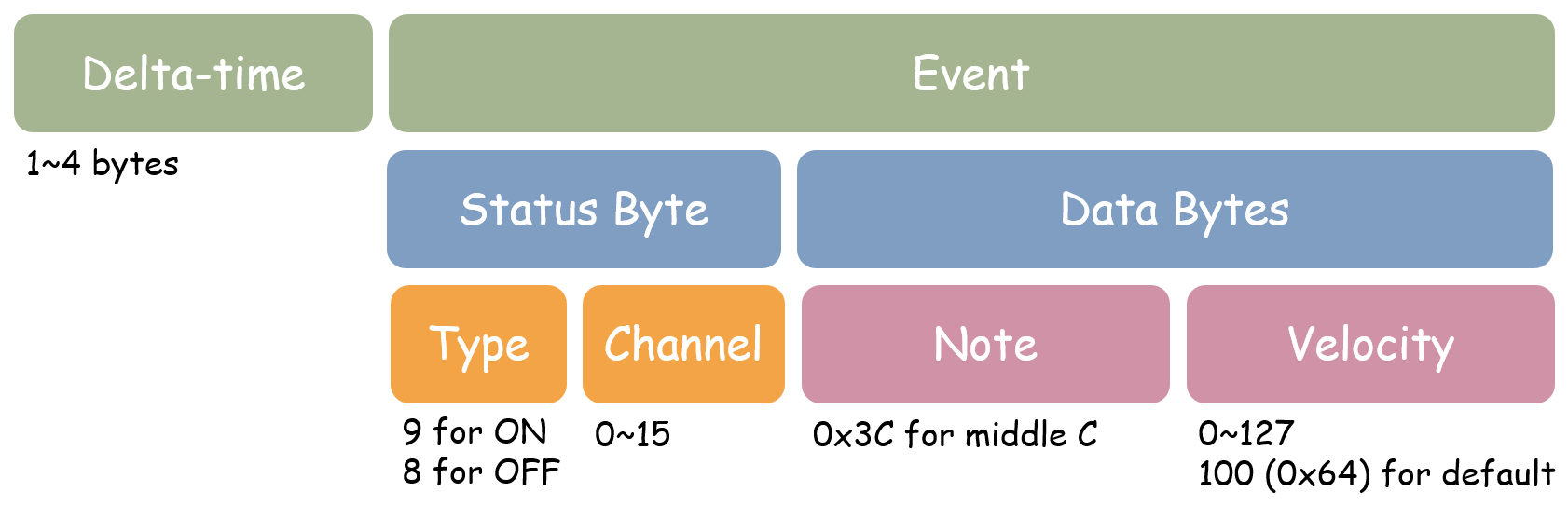
<p>Delta time/event pairs are used to represent MIDI events and the distance relative to its former event. The basic structure of the data pair is illustrated below:</p>

<p><img src="../../assets/images/posts/midi-from-scratch/event_structure.png" alt="" /></p>

<h3 id="delta-times">Delta-times</h3>

<p>Delta-time is the number of <em><code class="language-plaintext highlighter-rouge">tickdiv</code></em> after the previous event. It’s specified using variable-length representation with 1 to 4 bytes. The most significant bit of each byte is occupied for determining whether that byte is the last one in the data sequence.</p>

<p>Some of the eligible numbers before and after carrying are shown in the table below:</p>

<table>
  <thead>
    <tr>
      <th style="text-align: right">Decimal</th>
      <th style="text-align: right">Binary</th>
      <th style="text-align: right">Hexadecimal</th>
    </tr>
  </thead>
  <tbody>
    <tr>
      <td style="text-align: right">0</td>
      <td style="text-align: right">00000000</td>
      <td style="text-align: right">00</td>
    </tr>
    <tr>
      <td style="text-align: right">127</td>
      <td style="text-align: right">01111111</td>
      <td style="text-align: right">7F</td>
    </tr>
    <tr>
      <td style="text-align: right">128</td>
      <td style="text-align: right">10000001 00000000</td>
      <td style="text-align: right">81 00</td>
    </tr>
    <tr>
      <td style="text-align: right">16383</td>
      <td style="text-align: right">11111111 01111111</td>
      <td style="text-align: right">FF 7F</td>
    </tr>
    <tr>
      <td style="text-align: right">16384</td>
      <td style="text-align: right">10000001 10000000 00000000</td>
      <td style="text-align: right">81 80 00</td>
    </tr>
  </tbody>
</table>

<p>Note that only the last byte has a prefix of <code class="language-plaintext highlighter-rouge">0</code>, and the other bytes before it are all <code class="language-plaintext highlighter-rouge">1xxxxxxx</code>. Thus, a delta-time of <code class="language-plaintext highlighter-rouge">81 00</code> represents <code class="language-plaintext highlighter-rouge">128</code> in decimal instead of 33024.</p>

<p>More examples, as well as detailed explanations, can be found <a href="http://somascape.org/midi/tech/mfile.html#delta">here</a>.</p>

<h3 id="midi-events">MIDI Events</h3>
<p>Only three types of events are used in this sample. Other events including pitch bend, tempo, and instrument name are listed on the website <a href="http://somascape.org/midi/tech/mfile.html#midi">here</a>.</p>

<h4 id="1-note-on-event">1. Note On Event</h4>

<p><strong>9n</strong> + <strong>note</strong> + <strong>velocity</strong> (3 bytes)</p>

<p>In our example: <code class="language-plaintext highlighter-rouge">90 3C 64</code></p>

<ul>
  <li><code class="language-plaintext highlighter-rouge">9</code>: for Note On</li>
  <li><code class="language-plaintext highlighter-rouge">0</code>: MIDI channel number 0</li>
  <li><code class="language-plaintext highlighter-rouge">3C</code>: starting note is 3C (see note number chart below)</li>
  <li><code class="language-plaintext highlighter-rouge">64</code>: press velocity is 100 (0~127)</li>
</ul>

<h4 id="2-note-off-event">2. Note Off Event</h4>

<p><strong>8n</strong> + <strong>note</strong> + <strong>velocity</strong> (3 bytes)</p>

<p>In our example: <code class="language-plaintext highlighter-rouge">80 3C 64</code></p>

<ul>
  <li><code class="language-plaintext highlighter-rouge">8</code>: for Note Off</li>
  <li><code class="language-plaintext highlighter-rouge">0</code>: MIDI channel number 0</li>
  <li><code class="language-plaintext highlighter-rouge">3C</code>: ending note key is 3C (range: 00~7F)</li>
  <li><code class="language-plaintext highlighter-rouge">64</code>: release velocity is 100 (0~127)</li>
</ul>

<h4 id="3-end-of-track-event">3. End of Track Event</h4>

<p>In our example: <code class="language-plaintext highlighter-rouge">FF 2F 00</code></p>

<p>Therefore, the data <code class="language-plaintext highlighter-rouge">00 90 3C 64</code> means “At delta-time 0 from the beginning of MIDI channel 0, press down middle C with velocity 100.” Similarly, <code class="language-plaintext highlighter-rouge">60 80 3C 64</code> means “At delta-time 96 from the previous event at MIDI channel 0, release middle C with velocity 100.”</p>

<h2 id="midi-note-numbers">MIDI Note Numbers</h2>

<p>This chart displays all note numbers corresponding to each key and octave. The middle C is <code class="language-plaintext highlighter-rouge">3C</code> in hex, which is especially easy to remember.</p>

<table>
  <thead>
    <tr>
      <th style="text-align: center">Note \ Octave</th>
      <th style="text-align: center">-2</th>
      <th style="text-align: center">-1</th>
      <th style="text-align: center">0</th>
      <th style="text-align: center">1</th>
      <th style="text-align: center">2</th>
      <th style="text-align: center">3</th>
      <th style="text-align: center">4</th>
      <th style="text-align: center">5</th>
      <th style="text-align: center">6</th>
      <th style="text-align: center">7</th>
      <th style="text-align: center">8</th>
    </tr>
  </thead>
  <tbody>
    <tr>
      <td style="text-align: center">C</td>
      <td style="text-align: center">00</td>
      <td style="text-align: center">0C</td>
      <td style="text-align: center">18</td>
      <td style="text-align: center">24</td>
      <td style="text-align: center">30</td>
      <td style="text-align: center"><code class="language-plaintext highlighter-rouge">3C</code></td>
      <td style="text-align: center">48</td>
      <td style="text-align: center">54</td>
      <td style="text-align: center">60</td>
      <td style="text-align: center">6C</td>
      <td style="text-align: center">78</td>
    </tr>
    <tr>
      <td style="text-align: center">C# / Db</td>
      <td style="text-align: center">01</td>
      <td style="text-align: center">0D</td>
      <td style="text-align: center">19</td>
      <td style="text-align: center">25</td>
      <td style="text-align: center">31</td>
      <td style="text-align: center">3D</td>
      <td style="text-align: center">49</td>
      <td style="text-align: center">55</td>
      <td style="text-align: center">61</td>
      <td style="text-align: center">6D</td>
      <td style="text-align: center">79</td>
    </tr>
    <tr>
      <td style="text-align: center">D</td>
      <td style="text-align: center">02</td>
      <td style="text-align: center">0E</td>
      <td style="text-align: center">1A</td>
      <td style="text-align: center">26</td>
      <td style="text-align: center">32</td>
      <td style="text-align: center">3E</td>
      <td style="text-align: center">4A</td>
      <td style="text-align: center">56</td>
      <td style="text-align: center">62</td>
      <td style="text-align: center">6E</td>
      <td style="text-align: center">7A</td>
    </tr>
    <tr>
      <td style="text-align: center">D# / Eb</td>
      <td style="text-align: center">03</td>
      <td style="text-align: center">0F</td>
      <td style="text-align: center">1B</td>
      <td style="text-align: center">27</td>
      <td style="text-align: center">33</td>
      <td style="text-align: center">3F</td>
      <td style="text-align: center">4B</td>
      <td style="text-align: center">57</td>
      <td style="text-align: center">63</td>
      <td style="text-align: center">6F</td>
      <td style="text-align: center">7B</td>
    </tr>
    <tr>
      <td style="text-align: center">E</td>
      <td style="text-align: center">04</td>
      <td style="text-align: center">10</td>
      <td style="text-align: center">1C</td>
      <td style="text-align: center">28</td>
      <td style="text-align: center">34</td>
      <td style="text-align: center">40</td>
      <td style="text-align: center">4C</td>
      <td style="text-align: center">58</td>
      <td style="text-align: center">64</td>
      <td style="text-align: center">70</td>
      <td style="text-align: center">7C</td>
    </tr>
    <tr>
      <td style="text-align: center">F</td>
      <td style="text-align: center">05</td>
      <td style="text-align: center">11</td>
      <td style="text-align: center">1D</td>
      <td style="text-align: center">29</td>
      <td style="text-align: center">35</td>
      <td style="text-align: center">41</td>
      <td style="text-align: center">4D</td>
      <td style="text-align: center">59</td>
      <td style="text-align: center">65</td>
      <td style="text-align: center">71</td>
      <td style="text-align: center">7D</td>
    </tr>
    <tr>
      <td style="text-align: center">F# / Gb</td>
      <td style="text-align: center">06</td>
      <td style="text-align: center">12</td>
      <td style="text-align: center">1E</td>
      <td style="text-align: center">2A</td>
      <td style="text-align: center">36</td>
      <td style="text-align: center">42</td>
      <td style="text-align: center">4E</td>
      <td style="text-align: center">5A</td>
      <td style="text-align: center">66</td>
      <td style="text-align: center">72</td>
      <td style="text-align: center">7E</td>
    </tr>
    <tr>
      <td style="text-align: center">G</td>
      <td style="text-align: center">07</td>
      <td style="text-align: center">13</td>
      <td style="text-align: center">1F</td>
      <td style="text-align: center">2B</td>
      <td style="text-align: center">37</td>
      <td style="text-align: center">43</td>
      <td style="text-align: center">4F</td>
      <td style="text-align: center">5B</td>
      <td style="text-align: center">67</td>
      <td style="text-align: center">73</td>
      <td style="text-align: center">7F</td>
    </tr>
    <tr>
      <td style="text-align: center">G# / Ab</td>
      <td style="text-align: center">08</td>
      <td style="text-align: center">14</td>
      <td style="text-align: center">20</td>
      <td style="text-align: center">2C</td>
      <td style="text-align: center">38</td>
      <td style="text-align: center">44</td>
      <td style="text-align: center">50</td>
      <td style="text-align: center">5C</td>
      <td style="text-align: center">68</td>
      <td style="text-align: center">74</td>
      <td style="text-align: center">-</td>
    </tr>
    <tr>
      <td style="text-align: center">A</td>
      <td style="text-align: center">09</td>
      <td style="text-align: center">15</td>
      <td style="text-align: center">21</td>
      <td style="text-align: center">2D</td>
      <td style="text-align: center">39</td>
      <td style="text-align: center">45</td>
      <td style="text-align: center">51</td>
      <td style="text-align: center">5D</td>
      <td style="text-align: center">69</td>
      <td style="text-align: center">75</td>
      <td style="text-align: center">-</td>
    </tr>
    <tr>
      <td style="text-align: center">A# / Bb</td>
      <td style="text-align: center">0A</td>
      <td style="text-align: center">16</td>
      <td style="text-align: center">22</td>
      <td style="text-align: center">2E</td>
      <td style="text-align: center">3A</td>
      <td style="text-align: center">46</td>
      <td style="text-align: center">52</td>
      <td style="text-align: center">5E</td>
      <td style="text-align: center">6A</td>
      <td style="text-align: center">76</td>
      <td style="text-align: center">-</td>
    </tr>
    <tr>
      <td style="text-align: center">B</td>
      <td style="text-align: center">0B</td>
      <td style="text-align: center">17</td>
      <td style="text-align: center">23</td>
      <td style="text-align: center">2F</td>
      <td style="text-align: center">3B</td>
      <td style="text-align: center">47</td>
      <td style="text-align: center">53</td>
      <td style="text-align: center">5F</td>
      <td style="text-align: center">6B</td>
      <td style="text-align: center">77</td>
      <td style="text-align: center">-</td>
    </tr>
  </tbody>
</table>

<p>The same chart in decimal notation can be found <a href="http://somascape.org/midi/basic/notes.html">here</a>.</p>

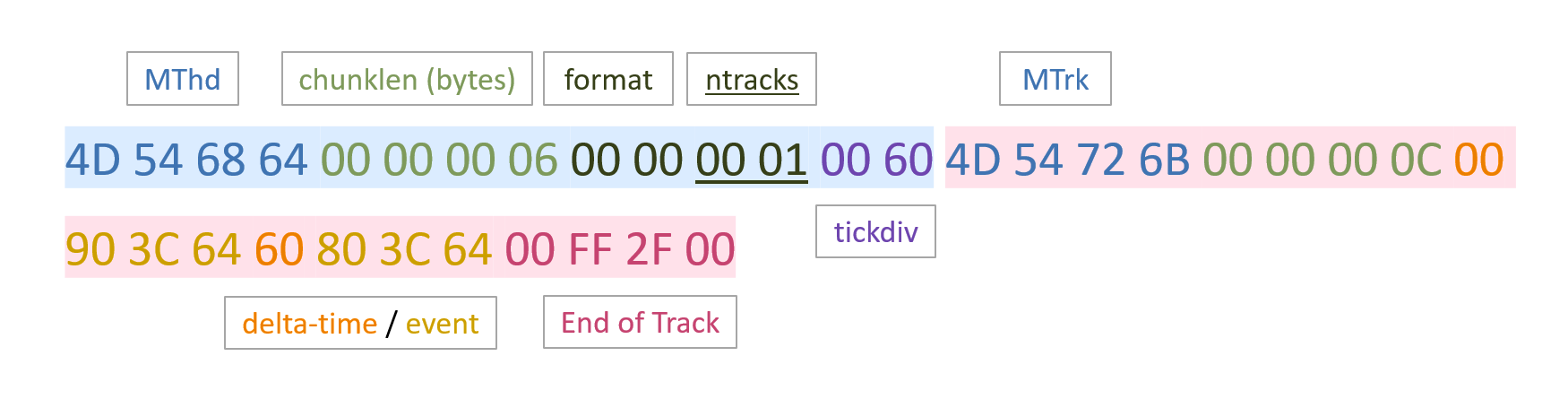
<h2 id="quick-review">Quick Review</h2>

<p><img src="../../assets/images/posts/midi-from-scratch/review.png" alt="" /></p>

<h2 id="interpreting-the-midi-file">Interpreting the MIDI File</h2>

<p>Files with the extension <code class="language-plaintext highlighter-rouge">.mid</code> can be read by various software and be viewed or edited in different notations. The following are two examples:</p>

<h3 id="staff">Staff</h3>

<p>Our example project is converted into a quarter note on a standard five-line staff using <a href="https://musescore.org/en">MuseScore</a>.</p>

<p><img src="../../assets/images/posts/midi-from-scratch/staff.png" alt="" /></p>

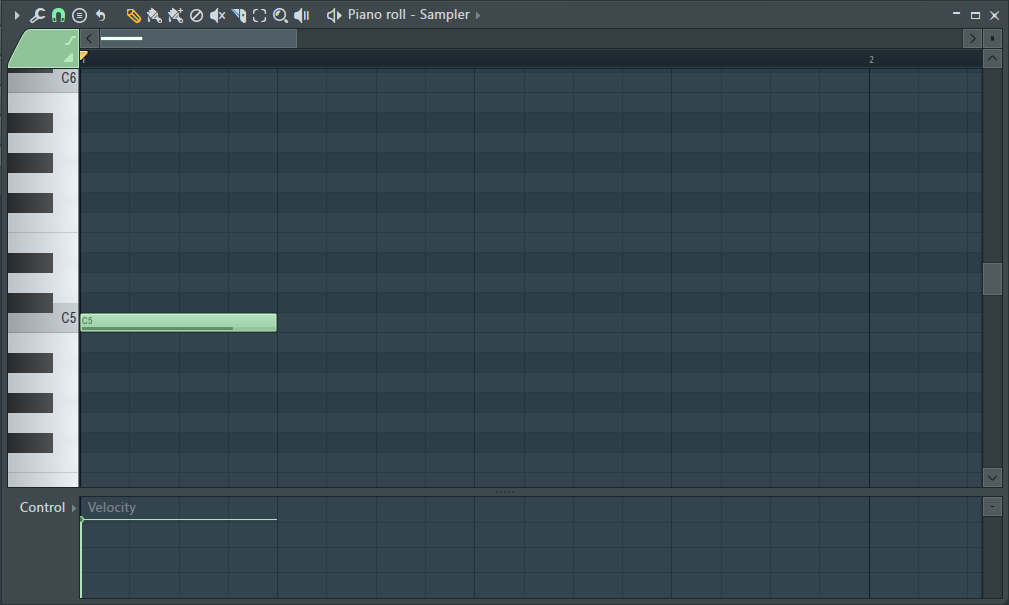
<h3 id="piano-roll">Piano Roll</h3>

<p>Notes can also be shown on a MIDI piano roll editor in <a href="https://www.image-line.com/flstudio/">FL Studio</a>.</p>

<p><img src="../../assets/images/posts/midi-from-scratch/piano_roll.png" alt="" /></p>

<h2 id="reference">Reference</h2>

<p>This tutorial is based on the information of MIDI Flies Specification from Somascape.</p>

<ul>
  <li><a href="http://somascape.org/midi/tech/mfile.html">MIDI Files Specification</a></li>
  <li><a href="http://somascape.org/midi/basic/notes.html">MIDI Note Numbers</a></li>
</ul>

<blockquote>
  <p>This is a guest post written by <a href="https://www.youtube.com/@J1soon">@J1soon</a>.</p>
</blockquote>]]></content><author><name>Johnson</name><email>admin@j3soon.com</email></author><category term="file-format" /><summary type="html"><![CDATA[A basic tutorial of how to create a simple MIDI file from scratch that contains only one note. What You Will Learn Using an example file, we’ll explain the meaning of each byte and how the MIDI file is constructed. After understanding the basics, we should be able to manually build a MIDI file with a simple HEX Editor or by writing a program. However, not all topics and usages will be covered. Only the minimum information we need to complete this example project will be introduced.]]></summary></entry><entry><title type="html">Hightower’s Algorithm</title><link href="/posts/hightower's-algorithm/" rel="alternate" type="text/html" title="Hightower’s Algorithm" /><published>2020-02-22T00:00:00+00:00</published><updated>2020-08-25T00:00:00+00:00</updated><id>/posts/hightower&apos;s-algorithm</id><content type="html" xml:base="/posts/hightower&apos;s-algorithm/"><![CDATA[<p>One of the traditional algorithms of solving routing problems in VLSI Design Automation is Hightower’s Algorithm.</p>

<p>I haven’t seen someone writing about this algorithm on the internet and only see some extremely high-level concept of it on some lecture slides.</p>

<p>Let’s dive into its details and think about the unsolvable conditions.</p>

<!--more-->

<div class="notice--primary">

  <p>📄 <strong>Source:</strong></p>

  <p><a href="https://dl.acm.org/doi/10.1145/800260.809014">📜 Hightower, 1969</a>, A solution to line-routing problems on the continuous plane, <a href="https://www.dac.com/">DAC</a> 1969.</p>

</div>

<h2 id="the-routing-problem">The Routing Problem</h2>

<p>In a 2D map, we have a source and a target point. We want to find a path that connects those 2 points, but there are obstacles on the map.</p>

<p>Previously, Mikami &amp; Tabuchi’s Algorithm can be applied to solve these problems, but it is restricted to grid maps and have a lot of computation overhead.</p>

<p>Hightower’s Algorithm is an enhanced version of Mikami &amp; Tabuchi’s Algorithm, and can work on continuous 2D maps.</p>

<h2 id="hightowers-algorithm">Hightower’s Algorithm</h2>

<p>Let \(S\), \(T\) be the source and target point.</p>

<ol>
  <li>
    <p>For \(S\) and \(T\) simultaneously, construct a vertical or horizontal escape line where \(S\), \(T\) is an object point.</p>
  </li>
  <li>
    <p>When a new escape line is constructed, an escape point is added under one of the 2 conditions:</p>

    <ul>
      <li>Just before the line hits an obstacle.</li>
      <li>Just passing one of the nearest parallel obstacle line segments.</li>
    </ul>

    <p>The escape points are found by moving a unit away from the object point, along the line. The process stops if an escape point is found, or meeting a previously created escape point. (The new escape point won’t cross an old escape point to avoid falling into an infinite loop)</p>
  </li>
  <li>
    <p>When a new escape point is found, set that escape point to be the new object point.</p>
  </li>
  <li>
    <p>If no escape point is found, that means there exists a previously created escape point on the line. Set the escape point to be one unit nearer the object point starting from the previously created escape point. If there are no such points, exit and report no route found.</p>
  </li>
  <li>
    <p>Repeat until one of \(S\)’s escape line meets one of \(T\)’s escape line.</p>
  </li>
</ol>

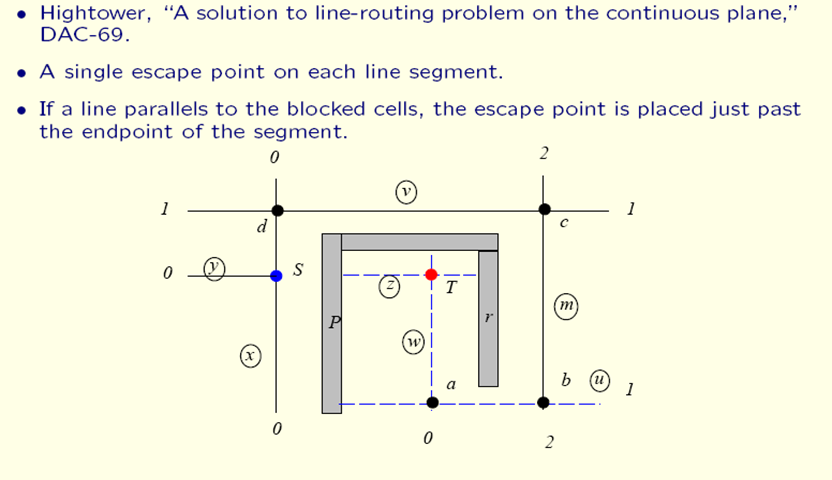
<p><img src="../../assets/images/posts/hightower's-algorithm/hightower's-algo.png" alt="hightower's-algo" /></p>

<p>Photo Credit: <a href="https://slideplayer.com/slide/12833152/">Prof. David Pan, Lecture 18. Global Routing (II)</a></p>

<h2 id="counterexample">Counterexample</h2>

<blockquote>
  <p>The algorithm does not use the same escape line more than once. This means that if the algorithm used an escape line to get into a box that had a very narrow opening, it could not get out again. – <a href="https://dl.acm.org/doi/10.1145/800260.809014">Hightower, 1969</a></p>
</blockquote>

<p>If the unit is infinitely small, the algorithm won’t fail to find an existing path.</p>

<p>But since discretizing the 2D map is necessary for practical uses, we can construct counterexamples that illustrates that how can Hightower’s Algorithm fail to find an existing path.</p>

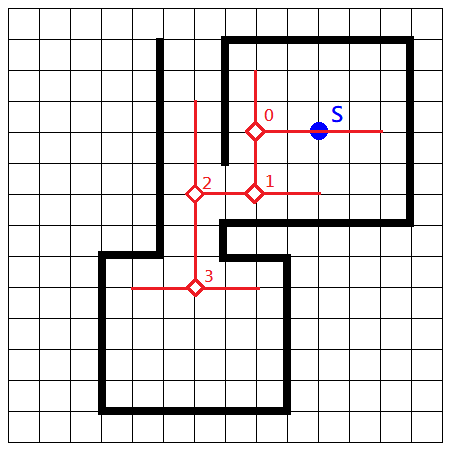
<p>A visualization of the counterexample mentioned in the conclusion of the original paper can be seen as:</p>

<p><img src="../../assets/images/posts/hightower's-algorithm/counter-example.png" alt="counter-example" /></p>

<p>The same structure should be used for both the source \(S\) and the target \(T\), while ensuring there exists a route between them. Since the Point-3 in the image blocks the only exit of the box and the unit size isn’t small enough for other escape lines to go past it, Hightower’s algorithm fails and cannot find an existing route in this map.</p>

<div class="notice">

  <p>✏️ <strong>Author’s Note</strong></p>

  <p>This issue is a trade off between efficiency and accuracy. The unit size should be chosen depending on the size of the map and available computation resources.</p>

</div>]]></content><author><name>Johnson</name><email>admin@j3soon.com</email></author><category term="algorithm" /><summary type="html"><![CDATA[One of the traditional algorithms of solving routing problems in VLSI Design Automation is Hightower’s Algorithm. I haven’t seen someone writing about this algorithm on the internet and only see some extremely high-level concept of it on some lecture slides. Let’s dive into its details and think about the unsolvable conditions.]]></summary></entry><entry><title type="html">About Johnson’s Site</title><link href="/posts/about/" rel="alternate" type="text/html" title="About Johnson’s Site" /><published>2020-01-30T00:00:00+00:00</published><updated>2022-02-25T20:51:58+00:00</updated><id>/posts/about</id><content type="html" xml:base="/posts/about/"><![CDATA[<p>Just another random site on the internet.</p>

<p>Disclaimers: The views and opinions expressed in this website are those of my own and do not represent those of my employer.</p>]]></content><author><name>Johnson</name><email>admin@j3soon.com</email></author><summary type="html"><![CDATA[Just another random site on the internet. Disclaimers: The views and opinions expressed in this website are those of my own and do not represent those of my employer.]]></summary></entry></feed>